
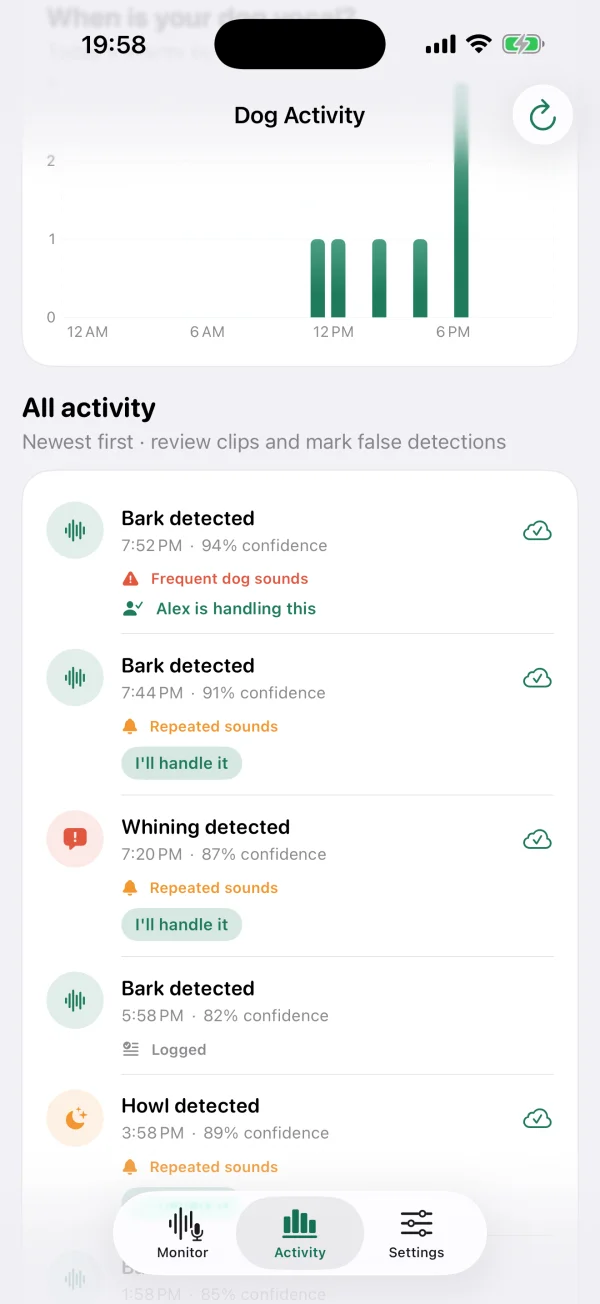
See the whole day afterwards
See when dog sounds were detected. If you save short clips, check what triggered an event on the device that listened.
Dog bark monitor for iPhone and iPad
Leave a spare iPhone or iPad at home with BarkPing open. Get alerts when dog sounds repeat. Turn on sound playback if you also want the home device to play a short sound.
On your phone
BarkPing
Frequent dog sounds were detected at home.
On-device analysis with private sound recognition
Short sound clips – optional and stored locally only
No BarkPing account – share events through iCloud
How it works
Start monitoring on an iPhone or iPad at home and keep BarkPing visible. The display stays awake automatically while the app listens.
Private sound recognition looks for dog barks directly on the device and can also detect howling and whining. No audio leaves the device.
Every detected dog sound is logged. When sounds repeat, BarkPing can send a private iCloud notification to your other devices and invited family members.
Sound after barking
Turn it on with one tap. Three detected barks in one minute is the default, and you can change the number. The listening device plays the sound.
Five included sounds play in turn, or you can use your own. Test at low volume with your dog first. A sound may redirect attention, but it cannot guarantee that barking stops.
Features
See when dog sounds were detected. If you save short clips, check what triggered an event on the device that listened.
Turn on howling and whining detection too. These sounds can offer more clues, but do not tell you on their own how your dog feels.
Adjust the confidence threshold and how closely barks are grouped into one event, so notifications fit your dog.
Invite family through Apple's private sharing – they get notifications with their own iCloud accounts, wherever they are.
While monitoring, BarkPing keeps the display awake and must remain visible. Locking the device or switching apps clearly stops listening.
No BarkPing server, no accounts, no ads. Events sync through your own private iCloud database.
Home alone
Many dogs bark, howl or whine when they're left behind – and most owners never find out. The neighbors hear it. You don't.
A sound log can help you find times and recurring patterns. Use it alongside other observations, for example when talking with a behavior professional or neighbor. Sound recognition can miss or misinterpret sounds.
Home-alone dog guides
Dog barks when left alone
Separation anxiety in dogs
Dog barking in an apartment
A short, controlled observation
Put a spare device to use
Choose how to observe your dog
Privacy
BarkPing processes sound on the listening device. No live listening and no audio uploads to BarkPing. Optional video clips are silent and shared only through private iCloud.
FAQ
No. In the current version, BarkPing must remain visible while it listens. The display stays awake automatically, but locking the device or switching apps stops monitoring.
BarkPing analyzes audio in real time with its local sound model. When detection clips are enabled, only the short model window that triggered a logged event is saved, plus brief pre-roll. These sound clips remain on the device, are never synced, and can be turned off in the app. Optional video clips are silent.
For remote alerts you need two devices: an iPhone or iPad listening at home and another with you. Install BarkPing on both, check iCloud and notification permissions, and send a test notification first.
Yes. With Family Circle you invite family through Apple's private sharing in Messages or Mail. They need BarkPing and their own iCloud account – but not your account or password.
No. iOS may delay or coalesce push notifications under its energy and network policies. Treat BarkPing as an attentive signal and a record – not as a safety system with guaranteed delivery.
iPhone and iPad on iOS or iPadOS 17 or later, with iCloud enabled. The app needs microphone access on the listening device and notification permission on the receiving ones.
No. BarkPing uses a local iOS sound model and Apple's private iCloud sharing, so it's only available for iPhone and iPad.
Yes, if you enable them in Settings. They are logged and can trigger household alerts under the same repeated-sound rules as barks.
You get one free hour of actual listening time. After that, choose a monthly or yearly subscription or a one-time 30-day pass. Prices appear in the app before purchase. Every option includes household alerts for up to five recipients.
BarkPing is available on the App Store for iPhone and iPad. Download it free and try one hour of listening.
Download on the App Store